
RoboGauge
🌎 English | 🇨🇳 中文
This repository provides a suite of motion-control evaluation for reinforcement-learning locomotion policies. The goal is to measure the following aspects of a policy, so we can partially predict Sim2Real performance and reduce the risk of damaging real hardware:
- Robustness: Under randomized terrains and ground types (e.g., friction / restitution), can the policy keep controlling stably?
- Stability: Are motor outputs reasonable? Does long-horizon execution risk motor overheating? Does it reach extreme joint positions?
- Control stability & accuracy: For velocity-tracking commands, can it track accurately? For target-point commands, how large is the final tracking error?
The evaluation is automated with MuJoCo and implemented fully in Python.
Demo of the evaluation process (4 terrains, 2 difficulty levels):
| Wave | Slope |
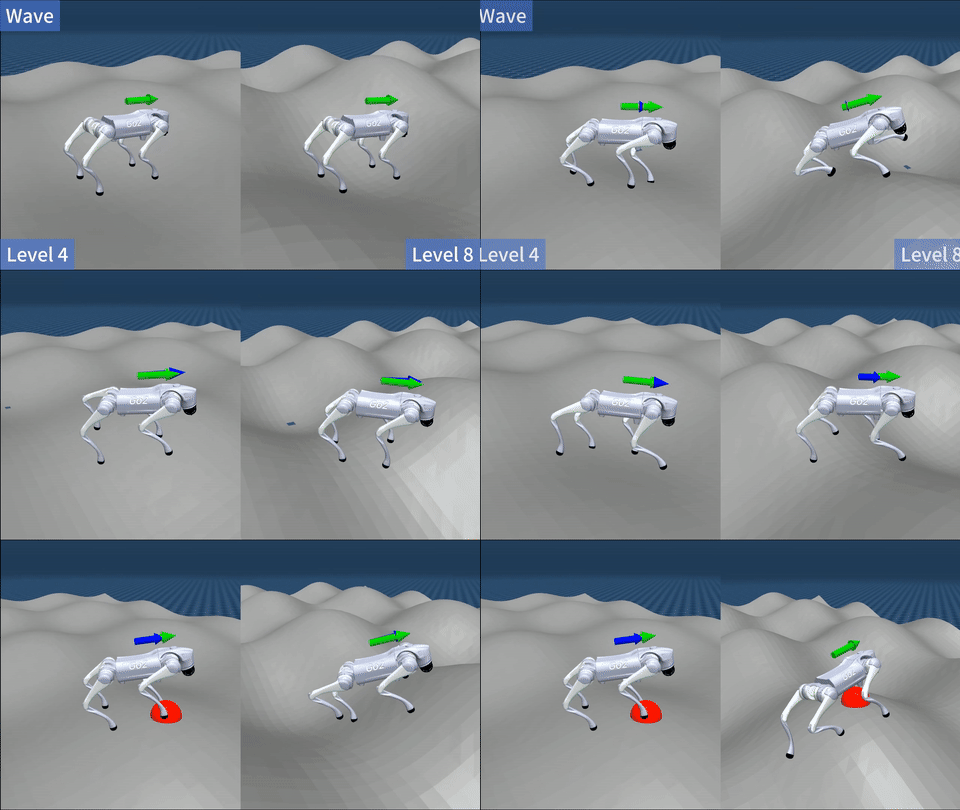 |
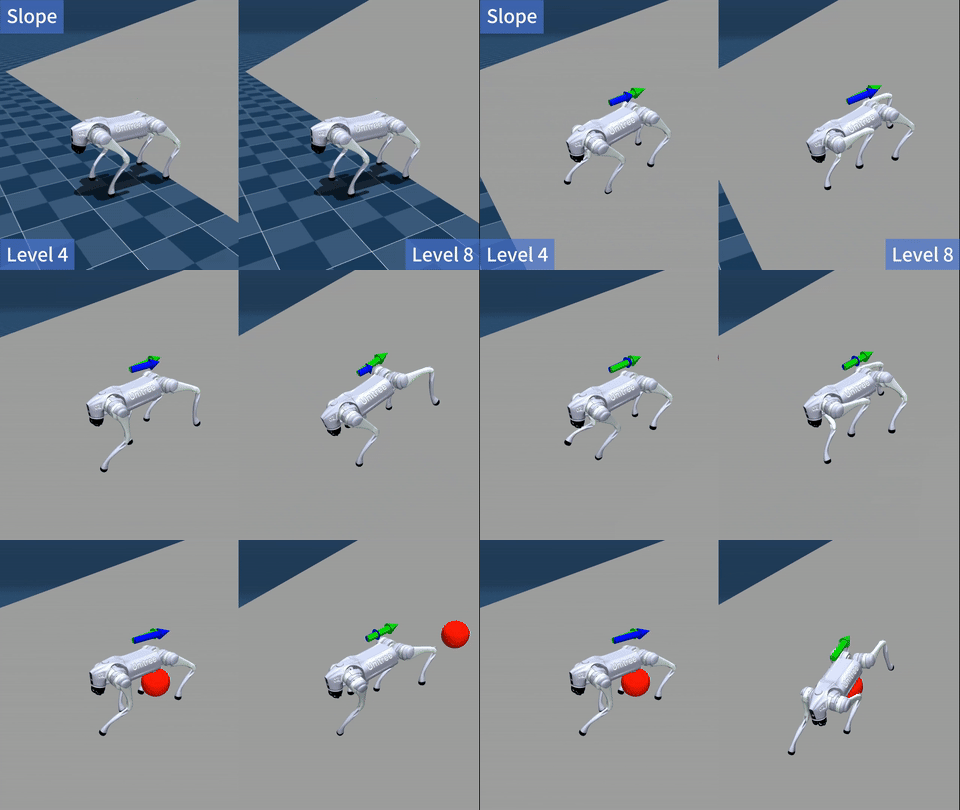 |
| Stairs | Obstacles |
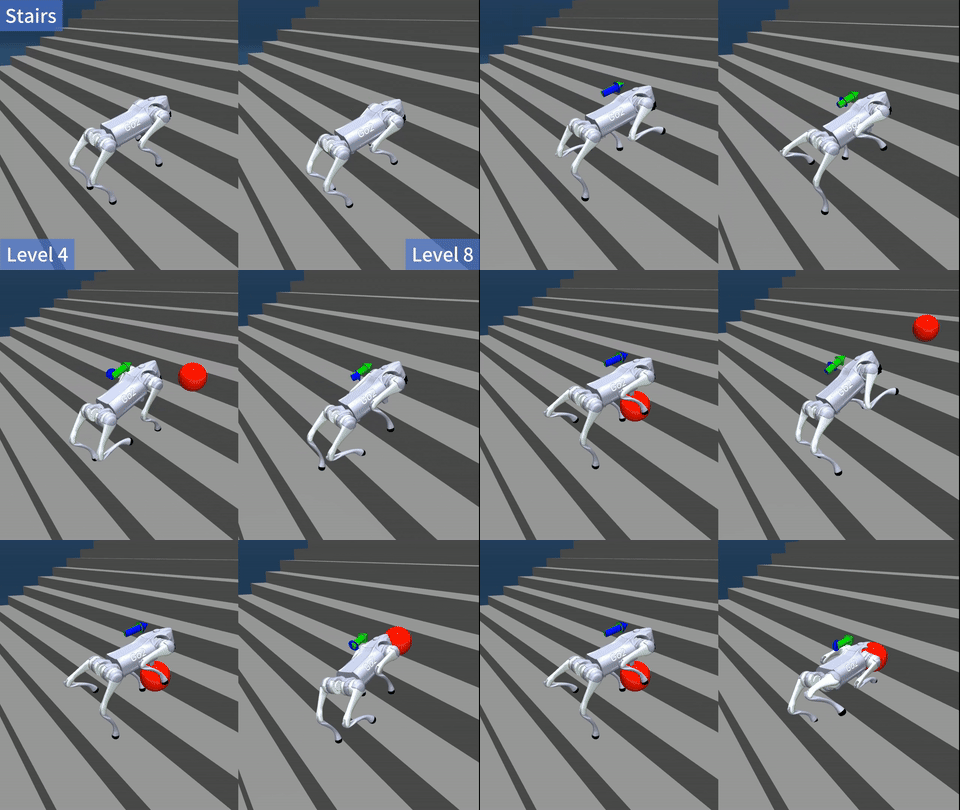 |
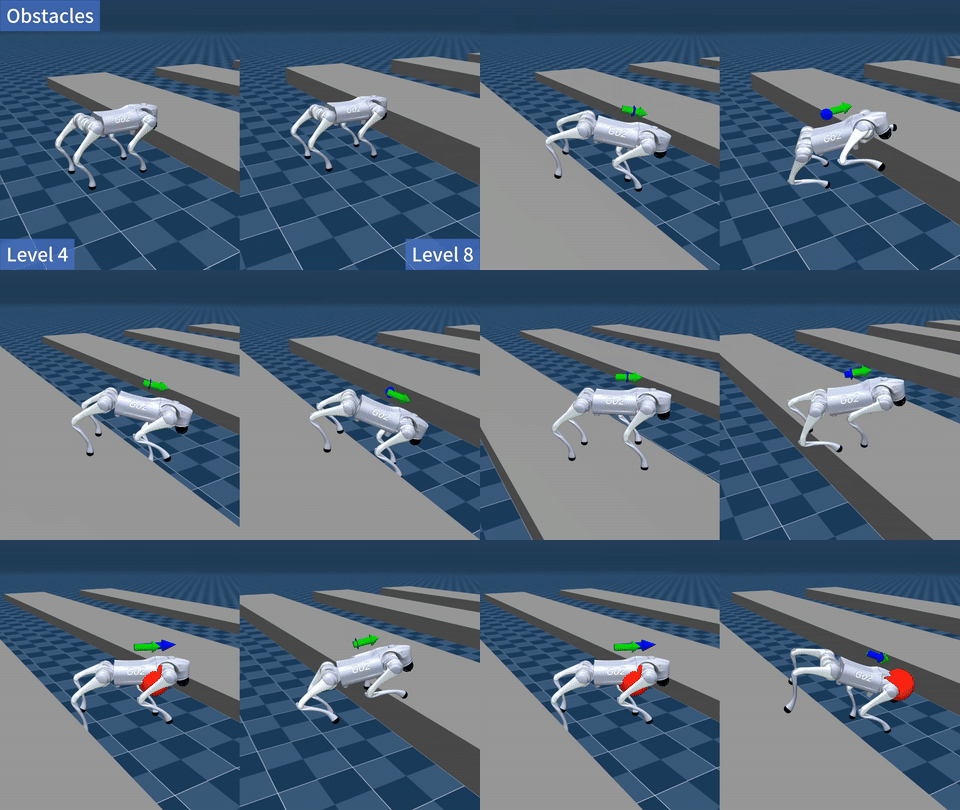 |
Supported Robots
| Robot | Type | Velocity Tracking |
|---|---|---|
| Unitree go1 | Quadruped | ✅ |
| Unitree go2 | Quadruped | ✅ |
Go1 Isaac Gym and RobotLab exports use different ONNX contracts: Gym uses a 5-frame, 225-value history, while RobotLab uses a 10-frame, 450-value history. Both TorchScript exports consume the current 45-value frame and maintain history internally. See the linked Go1 policy I/O guide for the exact layout.
Installation
Recommended environment: python=3.8. Install any PyTorch version >= 2.0 following the official PyTorch guide, then install this repo:
git clone https://github.com/wty-yy/RoboGauge.git
cd RoboGauge
pip install -e .
Usage
Run evaluations directly
We provide four evaluation modes: Single Pipeline, Multi Pipeline, Level Pipeline, and Stress Pipeline. Compute cost increases gradually, and parallel execution is supported to speed up evaluation. See examples in CMD.md.
Asynchronous evaluation during training
Start the evaluation server:
python robogauge/scripts/server.py
Key arguments:
--port: server port (default:9973)--num-processes: total number of evaluation processes (default:30)
The client robogauge/scripts/client.py submits evaluation requests to the server and returns results. Example:
from robogauge.scripts.client import RoboGaugeClient

# Create client and submit a test task
client = RoboGaugeClient(f"http://127.0.0.1:9973")
task_id = client.submit_task(
    model_path=test_payload["model_path"],
    step=test_payload["step"],
    task_name=test_payload["task_name"],
    experiment_name=test_payload["experiment_name"],
    wait_for_server=True
)

# Monitor task status and get results
while True:
    client.monitor_tasks()
    for task_id, resp in client.response_data.items():
        scores = resp['results']['scores']
        print("[RoboGaugeClient]📊 Scores:")
        print(json.dumps(scores, indent=2, ensure_ascii=False))
    client.response_data.clear()
    time.sleep(5)
Example integration: update_robogauge in go2_rl_gym - on_policy_runner.py
You can launch training with evaluation enabled via
python legged_gym/scripts/train.py --task=xxx --robogauge. The trainer waits for the evaluation client to be available. Results are saved underlogs/{experiment_name}and visualized in TensorBoard.
Env Params / Metrics / Goals
Metrics are computed by sending fixed commands to the environment for a fixed duration, reading required signals from MuJoCo, and aggregating them.
Environment Parameters
Domain Randomization
All evaluations are run with configured domain randomization (DR). Below are commonly used DR parameters:
| Parameter | Variable | Range |
|---|---|---|
| Random action execution delay | action delay |
<= RL control interval |
| Base payload mass | base mass |
-1, 0, 1, 2, 3 kg |
| Ground friction | friction |
0.2 ~ 1.0 (step 0.1) |
Terrains
- Supports a subset of terrains from
legged_gym, including:wave, slope, stairs up, stairs down, obstacles, flat. All terrains exceptflatcan be evaluated with increasing difficulty levels. - Ground material types (affecting contact friction / restitution) include: rubber, wooden floor, tile.
Metrics
Supported per-step metrics (measured after each env.step). All metrics are normalized so that higher is better:
| # | Metric | Description | Hyper-parameters | Normalization | Transform |
|---|---|---|---|---|---|
| 1 | dof_limits |
Magnitude of joint excursions beyond soft limits | Soft-limit threshold | Total joint range | 1-x |
| 2 | lin_vel_err |
L2 error of linear velocity tracking | NA | Total commanded linear-velocity range | 1-x |
| 3 | ang_vel_err |
L2 error of angular velocity tracking | NA | Total commanded angular-velocity range | 1-x |
| 4 | dof_power |
Motor energy consumption | Scaling factor | 100 | 1-x |
| 5 | orientation_stability |
Body orientation stability (Roll) | NA | NA | 1-x |
| 6 | torque_smoothness |
Torque smoothness | Scaling factor | 30 | 1-x |
| 7 | friction_margin |
Foot friction margin | Foot contact geom names | \mu f_{\text{normal}} |
1-x |
| 8 | zmp_margin |
ZMP margin | NA | Default diagonal foot distance | 1-x |
Velocity-Tracking Targets
Based on common issues observed in Sim2Real transfer, we organize metrics and their corresponding real-robot risks as follows:
| # | Description | Normalization | Real-robot issue | Terrain |
|---|---|---|---|---|
| 1 | Ratio of extreme joint values | Joint range | Dangerous high-stepping behavior during motion | Any |
| 2 | L2 error between linear velocity and command | Max linear command | Might fail to reach the requested speed | Any |
| 3 | L2 error between angular velocity and command | Max angular command | Might fail to reach the requested yaw rate | Any |
| 4 | Base-height variation at high speed / diagonal command jumps | Fixed height | Body crouches at high speed; loses balance when diagonal command flips | Flat |
| 5 | Stability after emergency stop at high speed | Fixed duration | Joints become unstable when standing still (e.g., on stairs) | Any |
Summary of velocity-related goals:
| # | Goal | Description | Reset condition | Max resets |
|---|---|---|---|---|
| 1 | max_velocity |
Maximum linear / angular speed along a single axis | Run one-direction command then hard stop | 6 |
| 2 | diagonal_velocity |
Diagonal velocity changes | Execute a pair of diagonal commands | 8 |
| 3 | target_pos_velocity |
Reach a target position via PD control | Target reached or timeout | 1 |
Create a New Task
Tasks are registered in robogauge/tasks/init.py. A evaluation task consists of four parts:
- BasePipeline: the standard pipeline (usually no changes needed)
- MujocoConfig: simulator configuration (usually no changes needed)
- BaseGaugeConfig: metric configuration (see below to add new metrics)
- RobotConfig: robot configuration (see below to add a new robot)
Add a New Metric
Create a new scenario / metric implementation under robogauge/tasks/gauge.
Add a New Robot
Create a new robot implementation and control-model configuration under robogauge/tasks/robots. See the go2 example:
- go2.py: control wrapper (inherits
BaseRobot), implements observation construction and action output - go2_config.py: config including robot XML path, control-model path, observation params, joint mapping order, scaling factors, control rate, etc.
Notes
Importing a New Robot / Control Model
- When creating a new robot XML, it must include torque-control
actuatorand sensors:sensor - jointpos, jointvel, imu (framequat, gyro, accelerometer). See resources/robots/go2/go2.xml. Important: actuator order must match joint order (this is referred to as the MuJoCo joint order). - Control-model related configuration is in robogauge/tasks/robots/base_robot_config.py under
RobotConfig.control. Joint orders may differ across simulators; ensuremj2model_dof_indicescorrectly maps MuJoCo joint order to the joint order used during training (IsaacGym uses the same order as MuJoCo). Keep other model configs consistent.
Code Architecture
Directory Structure
robogauge/: core Python packagerobogauge/scripts/: runnable entry scripts (run evaluation / start server)robogauge/tasks/: task system (sim config + metrics/scenes + robot + scheduling)robogauge/tasks/pipeline/: scheduling & execution layer (lifecycle, DR, parallel seeds, aggregation)robogauge/tasks/gauge/: gauge layer (command generation, metric computation, result aggregation)robogauge/tasks/robots/: robot adapters (obs/action, joint mapping, model loading, control rate)robogauge/tasks/simulator/: simulator wrappers / environment interfaces (MuJoCo integration, stepping, state access)robogauge/tasks/custom/: project-specific extensions and custom tasks
robogauge/utils/: utilities (logging, config/file helpers, stats, math)
resources/: simulation static assetsresources/robots/: robot assets (XML / meshes / textures), organized by robot typeresources/terrains/: terrain assets (e.g.,flat.xml, slope/stairs/wave/obstacle variants)resources/models/: policy/model resources
assets/: documentation assetsscripts/: helper shell scripts for running experiments
RoboGauge Framework
| Details | Diagram |
|---|---|
| RoboGauge evaluation framework consists of three parts as shown in the diagram on the right: Part A: BasePipeline handles a single evaluation environment, including terrain, robot, domain randomization, and raw metric computation. Part B: MultiPipeline launches multiple BasePipelines in parallel processes for multi-seed evaluation, while LevelPipeline calls MultiPipeline to find the highest difficulty terrain that the policy can handle. Part C: StressPipeline handles testing across all terrains, providing an overall RoboGauge score. |
 |
BasePipeline manages scheduling among the simulator sim, the gauge (command generation + metric computation) gauge, and the locomotion policy wrapper robot. It also includes exception handling, domain randomization, and observation noise.

MultiPipeline launches BasePipeline in multiple processes across different seeds and DR parameter sets, then merges result files.
LevelPipeline searches, for the current environment configuration, the highest terrain difficulty that the policy can stably pass (all three seeds pass).

Common Errors
MuJoCo OpenGL Context Error
mujoco.FatalError: an OpenGL platform library has not been loaded into this process, this most likely means that a valid OpenGL context has not been created before mjr_makeContext was called
Cause: MuJoCo cannot create an OpenGL context in headless mode.
Fix: In robogauge/scripts/run.py and robogauge/scripts/server.py, set os.environ['MUJOCO_GL'] to egl (GPU) or osmesa (CPU, slower).
Testing
A StressPipeline test was performed on an AMD EPYC 7763 64-Core Processor (3.09 GHz) with 64 processes. The total time for evaluating 63 tasks was 2'46". The command was CMD - stress pipeline + --num-processes 64
https://github.com/user-attachments/assets/7e19d831-1fc9-49db-99e0-c83cddddfb0b
Acknowledgements
Thanks to @windigal for terrains generation and editing the videos.
Citation
If you find our work helpful, please cite:
@inproceedings{wu2026robogauge,
    title={Toward Reliable Sim-to-Real Predictability for MoE-based Robust Quadrupedal Locomotion},
    author={Tianyang Wu and Hanwei Guo and Yuhang Wang and Junshu Yang and Xinyang Sui and Jiayi Xie and Xingyu Chen and Zeyang Liu and Xuguang Lan},
    booktitle={Proceedings of Robotics: Science and Systems},
    year={2026}
}